
CS-V
VARISPEED TAPE EFFECT
Varispeed you can automate, made for workflow efficiency. Capture audio with REC, draw speed and pitch movements, shape it as you like, and drag and drop onto your timeline or keep it looping in the plugin.
£49 LAUNCH PRICE
Includes VAT · £79.99 after launch
macOS: AU, VST3, AAX · Windows: VST3
System requirements →
MOTION
Draw the move.
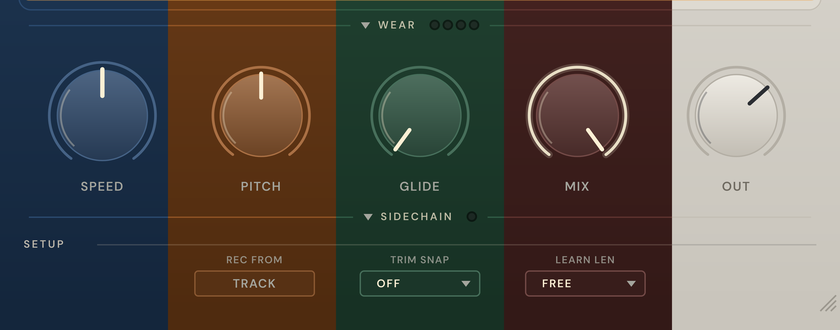
Draw automation for speed, pitch or both, and the clip follows it as it plays. Flip to PITCH to read the same move in semitones, then back to SPEED.
REC & VARISPEED
Capture it, then bend it.
Record a clip straight off a channel track, then watch the readout follow the move as it speeds up and slows down, anywhere from −75% to +300%.
TAPE
Tape on every track.
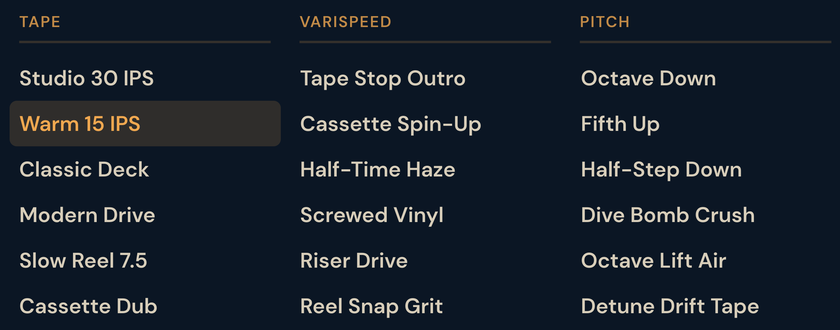
Switch between 30, 15 and 7.5 IPS, then dial in saturation and tone to taste.
WEAR
Age it.
Turn up wobble and wear and hear the tape get older. Switch on degrade for a digital or sampler crunch.
SIDECHAIN
Let another track drive it.
Feed in a kick and CS-V moves with it. Choose what it drives, how hard, and how fast it reacts.



TECHNICAL SPECIFICATIONS

macOS 12 (Monterey) and later *
64-bit AU, VST3 and AAX · tested in Logic Pro, Ableton Live and Pro Tools
Windows 10 or later
64-bit VST3 (AU and AAX are Mac only)
* Apple silicon and Intel Macs. On both platforms, installs, updates and activation go through the CoolSweat Center. Questions? Read the FAQ →

VST is a registered trademark of Steinberg Media Technologies GmbH. AAX and Pro Tools are trademarks of Avid Technology, Inc.
COOLSWEAT CENTER
One small app for the whole shelf. Install, update, activate and remove every CoolSweat tool from a single quiet window.
The free CS-V demo installs from here too. Just open the Center and choose try the demo.